태그 보관물: grpc

gRPC를 이용한 Observer Pattern

Remote에서 제공하는 기능을 마치 local system의 function call 처럼 제공 한다는 gRPC의 개념 자체는 1990년대에도 있었던 것이기에 새로울 것은 없지만, 그 위에서 “Subject의 변경이 있을 때 subscriber에게 notify 해주는 Observer Pattern을 어떻게 구현 할 수 있을까?”하는 의문이 들었다.

이 포스팅에서는 gRPC를 이용한 observer pattern의 예제로 server에서 임의의 주식과 그 변동 가격을 client로 notify 해주고 이것을 화면에 출력하는 예제를 작성해 본다. 전체 코드는 https://github.com/litcoder/grpcobsr에서 확인 할 수 있다.

기본적인 gRPC는 client에서 필요한 정보를 server에게 요청해서 그 결과를 돌려받는다. 반면, Observer Pattern은 그 반대로 server 측에서 정보의 변경 사항이 있을 때 이것을 client 측에 알려 주어야 한다.

이를 가능하게 하는 것은 ServerWriteRectorClientReadReactor template인데, 이들은 client의 요청에 대해 server가 여러 개의 응답을 비동기적으로 전송하는 이른바 gRPC의 server-side streaming을 구현하는데 가장 핵심이 되는 요소들이다. 우리 예제의 경우 client는 server로 “주식 가격을 알려 주세요”라는 request를 전송하면 ClientReadReactor의 OnReadDone() 함수로 변경된 주식과 가격이 하나씩 들어오는 식이다.

Proto file

주식 정보를 제공하는 proto file은 다음과 같이 정의 한다. 클라이언트가 UpdateStockPrice()를 요청하면 서버가 StockPriceResponse를 여러 개 stream으로 전송해 주는데 그 안에는 각각의 주식의 종목(symbol)과 가격(price) 정보가 담겨져 있다.

syntax = "proto3";
import "google/protobuf/empty.proto";

message StockPriceResponse {
    string symbol = 1;
    double price = 2;
}

service StockService {
    rpc UpdateStockPrice(google.protobuf.Empty) returns (stream StockPriceResponse);
}

StockPriceWriteReactor

StockPriceWriteReactor는 서버에서 동작하는 reactor이다.

class StockPriceWriteReactor
    : public ::grpc::ServerWriteReactor<::StockPriceResponse>
{
public:
  StockPriceWriteReactor(int evCnt);

  void OnWriteDone(bool ok) override;
  void OnDone() override;
  void OnCancel() override;

private:
  void NextWrite();

  int _mReqEventCount;
  int _mCurEventCount;
  StockPriceResponse _mResp;
  StockRepository _mStockRepo;
};
  • NextWrite(): 클라이언트로 전송할 데이터를 생성하고 stream에 쓴다.
  • OnWriteDone(): NextWrite()에서 호출하는 StartWrite()에 의해 하나의 정보가 쓰여졌을 때 호출되는 callback이다. 이전의 전송이 성공적으로 되었는지 검사하고 다음 정보를 전송한다.
  • OnDone(): Stream 전송 완료를 의미하는 Finish()를 호출하면 불리는 callback이다. 해당 인스턴스의 사용이 종료되었다는 의미이므로 메모리를 해제한다.

Server 구현

class StockServiceImpl final : public StockService::CallbackService
{
public:
  ...
  ServerWriteReactor<::StockPriceResponse> *UpdateStockPrice(
      CallbackServerContext *context,
      const google::protobuf::Empty *empty) override
  {
    return new StockPriceWriteReactor(_mEventCount);
  }
  ...
};

gRPC 비동기 호출을 위한 서버는 StockService::Server가 아닌 StockService::CallbackService를 상속받아 구현한다. StockService::Server가 write stream에 전송할 내용을 쓰고 grpc::Status를 반환 하도록 하는 것과 달리 CallbackService는 앞서 정의한 ServerWriteReactor<StockPriceResponse>* type을 반환 하도록 정의 되어있다.

StockPriceReadReactor

StockPriceReadReactor는 클라이언트에서 동작하는 reactor이다.

class StockPriceReadReactor
    : public ::grpc::ClientReadReactor<::StockPriceResponse>
{
public:
  StockPriceReadReactor(
      std::shared_ptr<StockService::Stub> stub, std::shared_ptr<Publisher> pub);
  void OnReadDone(bool ok) override;
  void OnDone(const ::grpc::Status &s) override;
  ::grpc::Status Await();

private:
  std::shared_ptr<Publisher> _mPub;
  ::grpc::ClientContext _mContext;
  ::StockPriceResponse _mResp;

  std::mutex _mMtx;
  std::condition_variable _mCondVar;
  ::grpc::Status _mStatus;
  bool _mAllDone = false;
};
  • OnReadDone(): StartRead() 호출을 통해 서버로 부터 하나의 record인 주식 정보 업데이트를 받을 때 마다 호출되는 callback이다. 이것을 이용해 Observer pattern에서 event publisher가 자신에게 등록된 subscriber들에게 event를 notify하는 코드를 구현할 수 있다.
  • OnDone(): 서버로 부터 stream 종료를 받으면 호출되는 callback이다. Await()과 공유되는 condition_variable을 이용해 process가 종료 될 수 있도록 한다.
  • Await(): 비동기 호출은 multi threading을 전체 하므로, 이 함수는 서버로 부터 받는 stream이 종료될 때까지 main thread가 종료되지 않고 유지 되도록 해준다.
  • mutext와 condition_variable: 위에서 설명한 OnDone()과 Await()이 thread control을 할 수 있도록 해주는 동기화 변수 들이다.

Client 구현

class StockClient
{
public:
  ...
  void updateStockPrice()
  {
    StockPriceReadReactor reader(_mStub, _mPub);
    Status status = reader.Await();
    if (status.ok())
    {
      spdlog::info("PriceListing succeed.");
    }
    else
    {
      spdlog::error("Failed to get prices.");
      spdlog::error("{}({})", status.error_message(), status.error_code());
    }
  }
  ...
};

클라이언트 코드는 StockPriceReadReactor의 instance를 만들고 Await()을 호출해서 서버로 부터 전송이 완료되기를 기다린다. 그럼 서버쪽으로 “주식 가격 주세요”라는 request는 누가 날리냐고? StockPriceReadReactor의 생성자에 다음과 같이 stub에 UpdateStockPrice()를 호출하는 부분이 정의되어 있다.

StockPriceReadReactor::StockPriceReadReactor(
    std::shared_ptr<StockService::Stub> stub, std::shared_ptr<Publisher> pub)
    : _mPub(pub)
{

  ::google::protobuf::Empty empty;
  stub->async()->UpdateStockPrice(&_mContext, &empty, this);
  StartRead(&_mResp);
  StartCall();
}

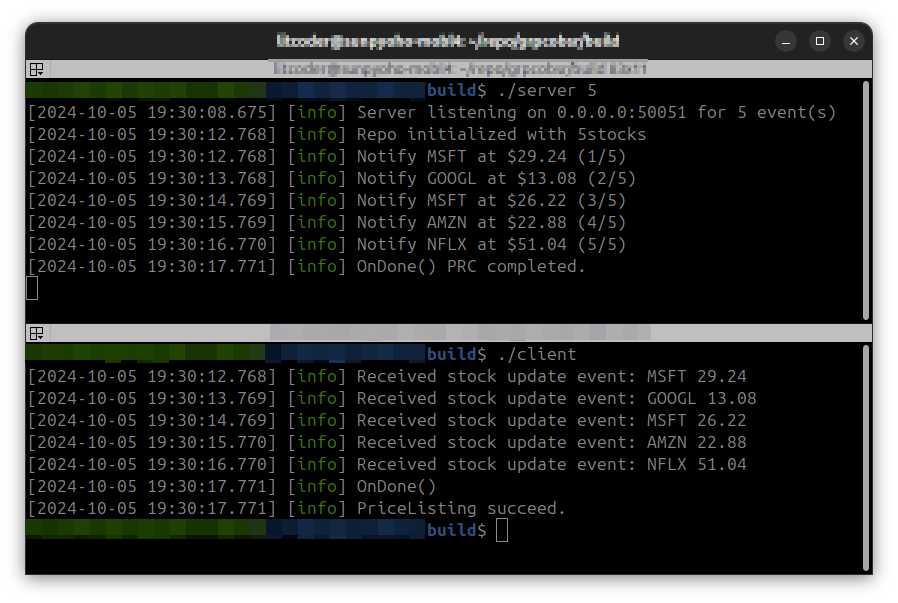
동작 확인

Code repo: https://github.com/litcoder/grpcobsr

References

  • gRPC Long-lived Streaming using Observer Pattern: Java로 gRPC의 Observer pattern을 구현한 내용을 설명한 글이다. 사실 본 포스팅의 시작도 원래는 이 구현을 C++로 변경해 보고자 하는 의도였으나 안타깝게도 C++에서 사용할 수 없는 의존성 때문에 많은 부분을 새롭게 작성해야 했다.
  • Asynchronous Callback API Tutorial: gPRC에 대한 비동기 호출에 대해 예제를 포함해서 매우 자세히 설명한 글이다. Observer pattern을 직접 언급하고 있지는 않으나 활용도가 높은 Unary, Server-side streaming, Client-side streaming 그리고 Bidirectional streaming을 설명한다.
  • gRPC API reference: API들에 대한 설명을 찾아 볼 수 있다. 친절하게 설명된 문서는 아니지만 그래도 없는 것 보다는 뭐…

CMake FetchContent의 target이 중복되는 문제

CMake의 FetchContent는 빌드 과정까지 처리해 주기에 git-submodule 보다 편리한 방식인 것 같다. 다만, version 3.22.1 기준으로 여러 프로젝트 들이 동일한 target이름을 중복해서 선언하는 경우에는 이를 잘 처리 하지 못하고 위와 같은 에러를 뱉고 종료되는 문제가 있다.

-- Found systemd via pkg-config.
CMake Error at build/_deps/grpc-src/CMakeLists.txt:667 (add_custom_target):
  add_custom_target cannot create target "tools" because another target with
  the same name already exists.  The existing target is a custom target
  created in source directory
  "<absolute_path_to_the_build_dir>/_deps/vsomeip-src".
  See documentation for policy CMP0002 for more details.

위의 오류는 COVESA의 vsomeip project와 gRPC를 FetchContent로 구성하는 중에 발생한 것인데, 두 프로젝트 모두 “tools”라는 custom target을 선언하기 때문에 중복으로 오류가 발생한 것이다.

아쉽게도 현재로써는 깔끔하게 해결하는 방법은 없는 것 같고, 두 프로젝트 중 하나의 custom target 이름을 변경해서 중복되지 않도록 해 주는 패치를 작성해서 FetchContent의 PATCH_COMMAND에 인자로 넣어주는 방법으로 회피가 가능하다.

먼저 vsomeip project의 custom target인 tools를 vsomeip_tools로 변경하는 패치를 다음과 같이 작성하고 fix_custom_target.patch로 저장한다.

diff --git a/CMakeLists.txt b/CMakeLists.txt
index 3501e02..0467426 100644
--- a/CMakeLists.txt
+++ b/CMakeLists.txt
@@ -654,7 +654,7 @@ add_subdirectory( examples/routingmanagerd )
 endif()
 
 # build tools
-add_custom_target( tools )
+add_custom_target( vsomeip_tools )
 add_subdirectory( tools )
 
 # build examples
-- 
2.34.1

다음으로 FetchConetnet에 PATCH_COMMAND argument를 명시한다.

# VSOME/IP
set(
    fix_custom_target
    git apply ${CMAKE_CURRENT_SOURCE_DIR}/fix_custom_target.patch
)
FetchContent_Declare(
    vsomeip
    GIT_REPOSITORY https://github.com/COVESA/vsomeip.git
    GIT_TAG <GIT_TAG>
    PATCH_COMMAND ${fix_custom_target}
)

FetchContent_MakeAvailable(vsomeip gRPC)

이제 cmake를 실행하면 patch가 적용되어 중복되는 target 이름 문제를 해결할 수 있다.

하지만 이 해결책은 아직 깔끔하진 않은데 그 이유는 처음 cmake를 실행하면 patch가 적용되면서 잘 되지만 두번째로 cmake를 실행 할 때는 이미 적용된 patch 때문에 git apply 명령어가 실패 하기 때문에 매번 patch가 적용된 directory(_deps/vsomeip-src)로 이동해서 git checkout -f를 실행해 주어야 하기 때문이다.

최종버전

git apply의 –reverse –check 옵션을 사용하면 패치가 적용되어 있는지 여부를 검사할 수 있으니 이 것을 이용해서 다음과 같은 간단한 shell script를 만들고 apply_patch_if_not.sh로 저장한다.

#!/usr/bin/env sh
# apply_patch_if_not.sh
# Apply given patch if not already applied.
#
#                         - Sep 2024, litcoder

if [ -z $1 ]; then
  echo "Usage: $0 <patch file path>"
  exit 1
fi

# Check if the patch was already applied.
git apply --reverse --check $1
if [ $? -eq 0 ]; then
  echo "The patch already applied, skip."
  exit 0
else
  # Apply the patch
  git apply $1
fi

이제 앞에서 작성한 FetchContent_Declare가 이 script를 부르도록 변경한다.

# VSOME/IP
set(
    fix_custom_target
    apply_patch_if_not.sh ${CMAKE_CURRENT_SOURCE_DIR}/fix_custom_target.patch
)
FetchContent_Declare(
    vsomeip
    GIT_REPOSITORY https://github.com/COVESA/vsomeip.git
    GIT_TAG <GIT_TAG>
    PATCH_COMMAND ${fix_custom_target}
)

FetchContent_MakeAvailable(vsomeip gRPC)